PS5 Hidden Setting Will Save You Time When Starting New Games


This PS5 setting will save you a lot of time when starting a new game, as well as making your game time a little less tedious.
Video game difficulty can come in all shapes and sizes, whether it’s action-adventure, strategy, shooter, sports, or more. What we might find difficult could be a piece of cake for someone else, and vice versa.
It’s why some people can get along with the likes of Dark Souls with considerable ease, but that person might suck at EA Sports FC 26.
As such, we can often spend a lot of time tinkering with in-game settings to make sure that a game suits our needs. Whether we want a steep challenge, coast through a game or something in between.
Adjust Your PlayStation 5 Game Presets With Ease
The PlayStation 5 has plenty of hidden features that we might not know about, such as this trick to extend the life of the DualSense controller's battery or this trick that can instantly mute all in-game party chat with ease. In fact, here’s a list of some of the most helpful PlayStation 5 hidden features that you might not know about!
Advert
However, did you know that you also don’t have to go into a game's settings to change the difficulty every time? In fact, you can set a default on your PlayStation 5 so that a game will, for the most part, launch with the preset of your choosing.
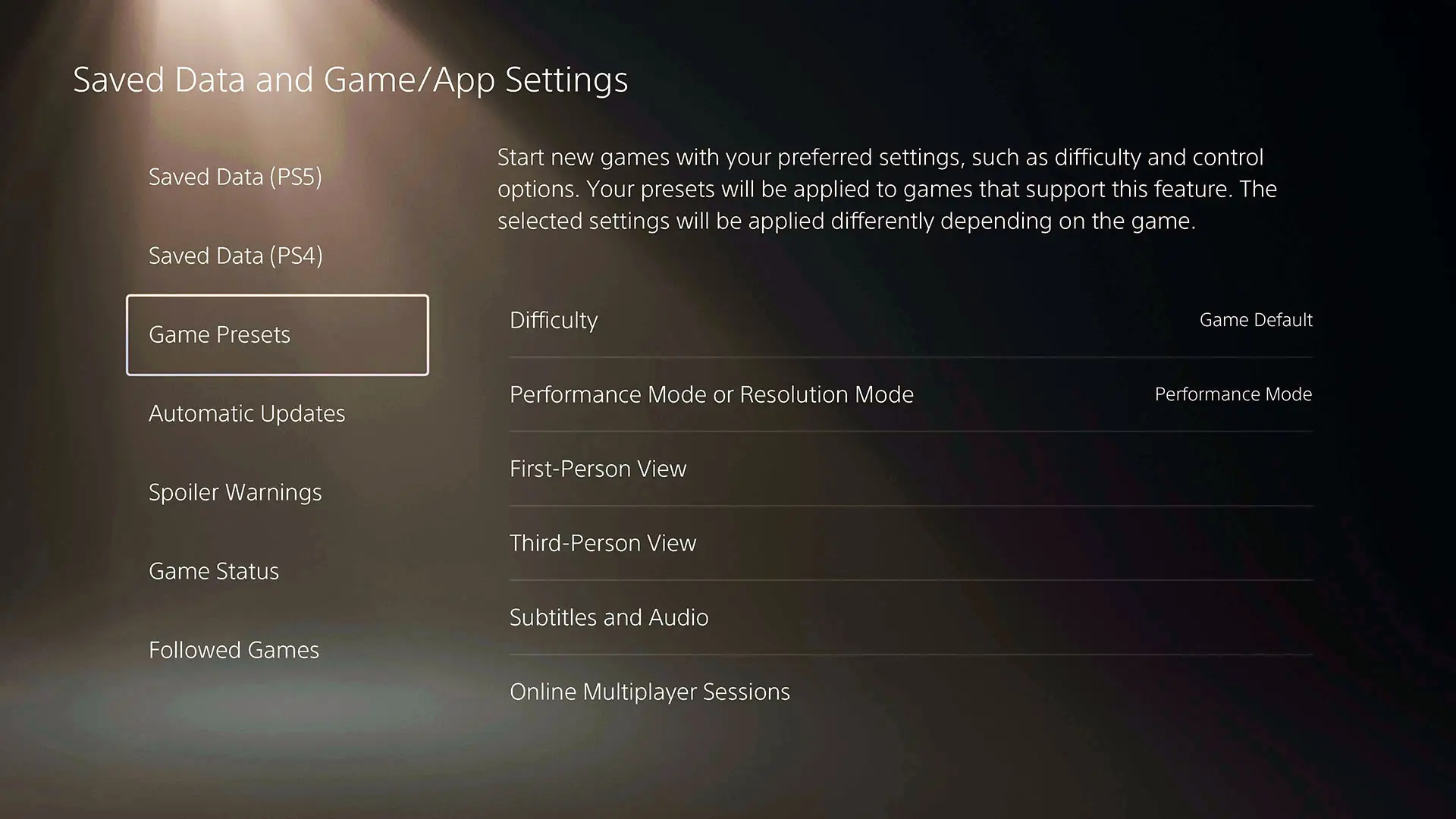
These settings extend beyond a default difficulty across games, because you can also choose performance and resolution modes, adjust vertical and horizontal cameras in first and third-person games to inverted or normal, as well as tweak various subtitle, audio and online multiplayer defaults.
If you want to see more from GAMINGbible, make us a preferred source on Google.
To change all of the above to the defaults of your choosing, simply go to the settings menu on your PlayStation 5, select ‘Save Data and Game/App Settings’, go to ‘Game Presents’, and you’ll be able to tinker with all that’s mentioned above.
It’s why I’m rarely caught off guard when playing a first-person shooter like Battlefield 6 with the “normal” camera settings. Inverted for the win!
So hopefully, going forward, that should make it so that you don't have to change these settings every time you start a new game.
PlayStation fans shouldn't forget that a State of Play is due to held later today. We'll be bringing you live announcements and news, so don't miss that.
Topics: Tech, PlayStation, PlayStation 5, Sony