PS5 common 'not enough storage' error can be fixed with this simple trick


There’s a problem that’s been plaguing me for several years now, and from trips to sites like Reddit, I know I’m not alone.
PlayStation 5 consoles have a habit of telling you you don't have enough console storage when you most definitely do.
Just yesterday, my copy of Fortnite needed to install an update which required just over 10GB of data.
I have the launch model of the PlayStation 5, which comes with around 825GB of data and as of last night, I had around 350GB of that free and unoccupied.
Advert
There’s no reason why, then, a 10GB update should be saying “error” and “not enough storage”, prompting me to “free up space” when I actually have over 35 times what’s required.
Thousands, if not millions, of PlayStation 5 gamers will likely have encountered this bug.
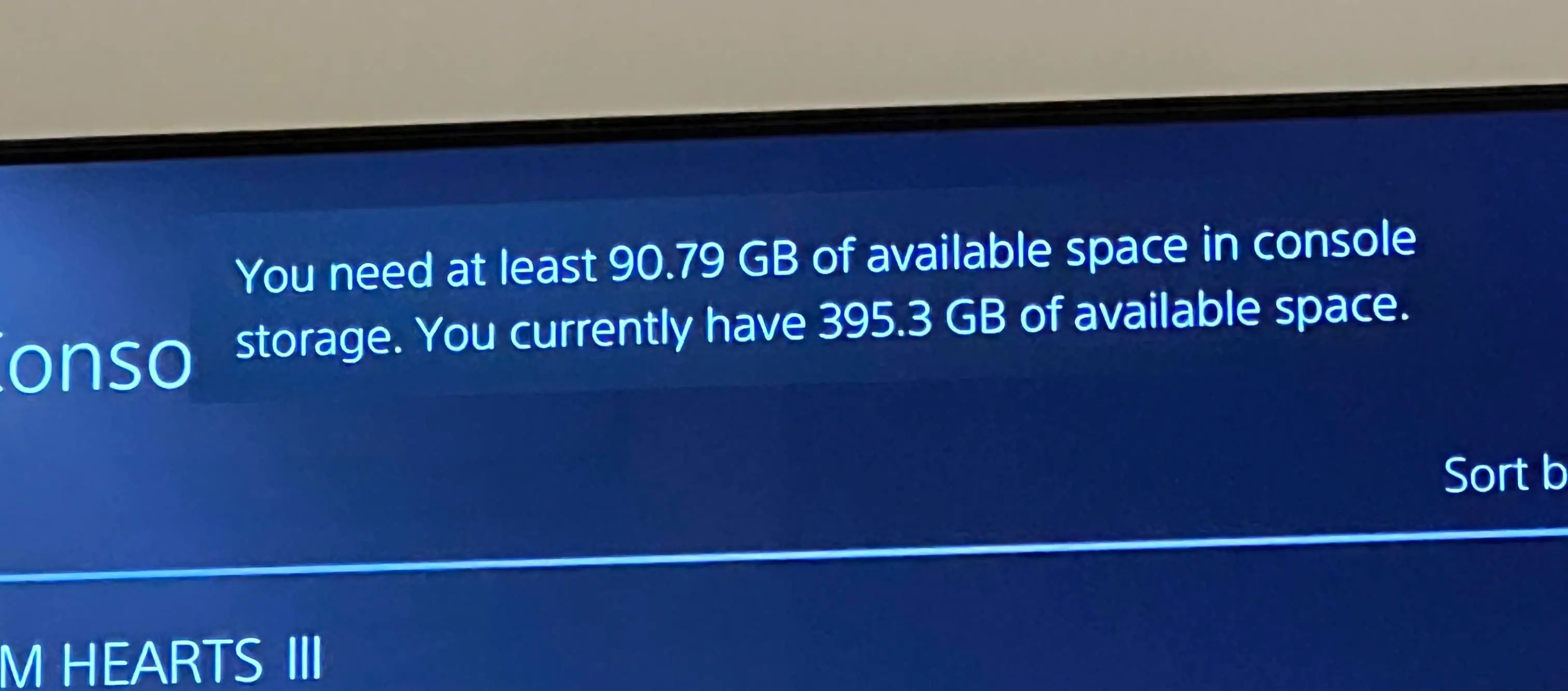
Pressing free up space doesn’t take you to the usual screen; instead, it prompts the update to start again, which, in turn, prompts the error message again.
You get stuck in a frustrating cycle where nothing except needlessly clearing your games rectifies the issue.
If you’re reading this plagued with the very same problem, there is actually a solution that I can attest instantly solves the error, and my god, I wish I’d known about this earlier.
How to fix PlayStation 5’s “not enough storage” bug when storage is free
It goes without saying that this fix only works if you genuinely do have ample storage available.
For those who tick that box, power off your PlayStation 5 completely. Do not use rest mode.
Then, hold the power button on the console and keep your finger pressed down. You’ll hear the normal start-up beep, but the trick is to wait until a second beep sounds; then you can remove your finger.
This boots up the console in safe mode. Your PlayStation 5 will prompt you to plug in your DualSense controller’s lead.
You can then use the DualSense’s D-pad to navigate down a short menu to where it says “repair console storage”.
Press that and allow the repair to begin. It’ll show a progress bar, which should only take a few short moments to complete.
After this, you’re free to use your PlayStation 5 as normal again, and you’ll likely notice that whatever broken installation was plaguing you will have immediately started downloading without issue.
READ MORE: 6 Hidden PS5 Hacks Most Players Still Don’t Know About
Since applying this fix, the error certainly hasn’t bothered me.
As for why PS5 storage can need repairing, it’s usually linked back to if the console has suffered an improper shutdown.
That might concern a power cut or being switched off at the mains, for example, without being powered down first.
Oftentimes, such abrupt shutdowns are out of your hands, but it’s good to know that hidden within a secret menu is a fix that can safely rectify the problem.
It doesn’t require any technical knowledge to apply this fix, and it is repeatable should the issue surface again.
External storage costs an arm and a leg these days, so making the most of what’s built into your console is of utmost importance.
Hopefully this solution eases your woes as much as it has eased mine.
Topics: PlayStation, PlayStation 4, PlayStation 5, Tech, Sony