
PlayStation Plus: How to share PS5 games and PS Plus with family for free


PlayStation 5 games can be expensive, especially for families in the same household trying to keep up with all the latest releases. On top of that, you might also have a PlayStation Plus subscription to pay for.
Thankfully, there's a way to keep those costs down by sharing your PS5 games and eligible PS Plus benefits without family members having to pay for additional subscriptions. It can all be done through the PS5’s ‘Console Sharing and Offline Play’ feature, as outlined in Sony’s official guidance.
I use this feature to share my digital games and PS Plus subscription with my son, meaning we can both enjoy games like EA Sports FC 27 through a single digital purchase rather than having to buy two separate copies.
Can you share PS5 games and PlayStation Plus with family for free?
Yes, you can. We'll explain exactly how to do this, and it's probably a much easier process than you might think.
Only one account needs to purchase the digital games and pay for a PlayStation Plus subscription. In my case, I'm the account holder, and I share those benefits with my son. You don't need to share your password with family members, although the account holder will need to sign into their PlayStation Network account on the other PS5 to enable the feature.
How to share PS5 games and PlayStation Plus with family
If you're the main account holder, as I am in my household, you'll need to enable Console Sharing and Offline Play on the other family member's PS5. In my case, that's my son's console.
Advert
It's worth noting that this setting is automatically enabled on the first PS5 you sign into with your PlayStation Network account. If you want to share your games and PS Plus benefits on a second PS5, you'll need to change this setting.
To enable Console Sharing and Offline Play on another PS5, simply follow these instructions:
- Sign in to your PlayStation Network account on the other PS5.
- Open Settings.
- Select Users and Accounts.
- Select Other.
- Choose Console Sharing and Offline Play.
- Select Enable.
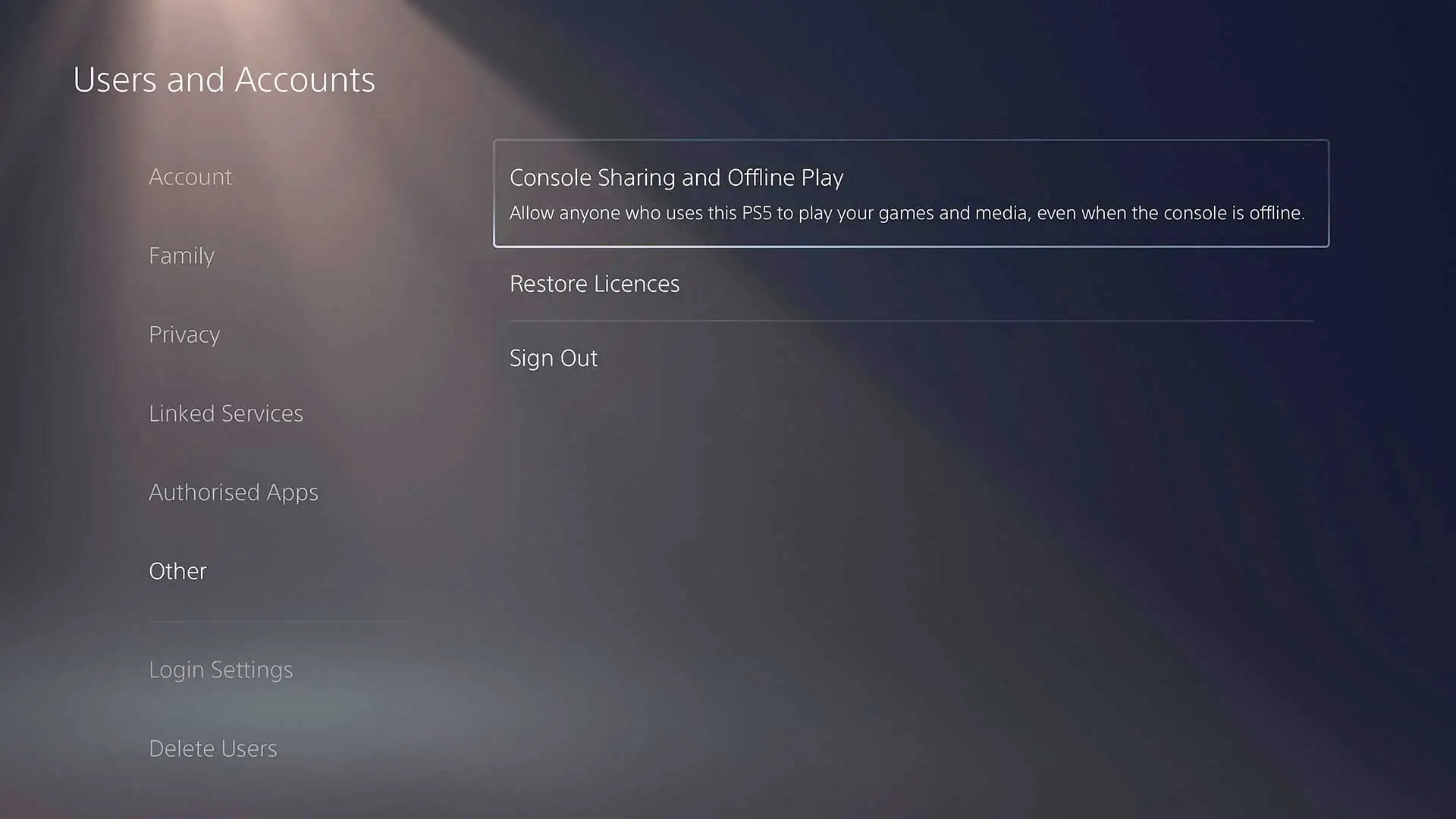 PS5's Console Sharing and Offline Play, GAMINGbible
How to share your PS5 games with another account
Once that setting has been changed, you're nearly ready to let your family member play your digital games.
- First, sign in to your PlayStation Network account on the other PS5.
- Go to your Game Library and download whichever games and compatible DLC you want to share on that console.
- Once the downloads are complete, sign in to the other account (which would be my son's) on the same PS5. They can then play the downloaded games through their own profile, without needing to make a second purchase.
- What's more, the account holder (me) doesn't need to remain signed in. You can sign out and carry on playing on your own PS5, while your family member plays on theirs.
Which PlayStation Plus benefits can you share?
As long as you have an active subscription and have enabled Console Sharing and Offline Play on the other PS5, your family member can enjoy several of your PS Plus benefits without needing their own subscription.
That includes online multiplayer, downloaded Monthly Games and games from the Game Catalogue and Classics Catalogue, depending on your subscription tier. The Classics Catalogue requires PS Plus Premium.
However, there are some benefits that cannot be shared, as explained in the official PlayStation guidance. These include cloud storage, redeeming Monthly Games on another account, purchasing games at a PS Plus discount, automatic patch downloads and early access to time-limited game trials.
Can you share PlayStation Plus with your child?
As already mentioned, yes, you can. But we'll go into a little more detail here.
Along with being able to use eligible PS Plus benefits, your child can still use their own PSN account when playing games on their PlayStation 5. However, what they're able to access will depend on their age and the parental controls you've set up.
For example, if your child has an account with an age restriction that prevents them from playing an 18-rated game, they won't automatically be able to access that title just because it's available through your game library or PS Plus subscription.
You can also manage what your child is able to access on their PS5 through PlayStation's parental controls. This includes restrictions on games and apps, communication with other players, playtime and spending limits.
To manage these settings, Sony has an official PlayStation Family app for Android and iOS.
Can you share PS Plus and games across two PS5 consoles?
You can enable Console Sharing and Offline Play on one PS5 at a time, allowing other users on that console to access your eligible digital games and PS Plus benefits.
However, you can still sign into your own account and play your purchased digital games on another PS5. This means you and a family member can play the same game at the same time, provided you're using separate PSN accounts. For example, my son can play EA Sports FC 27 on his PS5 using his own account, while I play on my PS5 using mine, without needing to purchase two copies.
If you sell your PS5 or no longer have access to it, you can remotely deactivate your consoles through PlayStation's Account Management website. This deactivates all consoles associated with your account, allowing you to enable Console Sharing and Offline Play on another PS5 afterwards. However, PlayStation limits remote deactivation of all devices to once every six months.
READ MORE: PS5 overheating: How to fix it and keep your console cool
Do you need to pay for two PlayStation Plus subscriptions?
As mentioned above, no, you don't need to pay for two PlayStation Plus subscriptions when sharing with a family member on the same PS5, provided Console Sharing and Offline Play are enabled.
However, the main account holder will need to maintain an active PS Plus subscription for the subscription-dependent benefits to remain available.
Can you share PS5 games offline without an internet connection?
By enabling Console Sharing and Offline Play, other users on that PS5 can play your purchased and downloaded digital games, even without an internet connection.
Topics: PlayStation, PlayStation 5, Tech, Sony