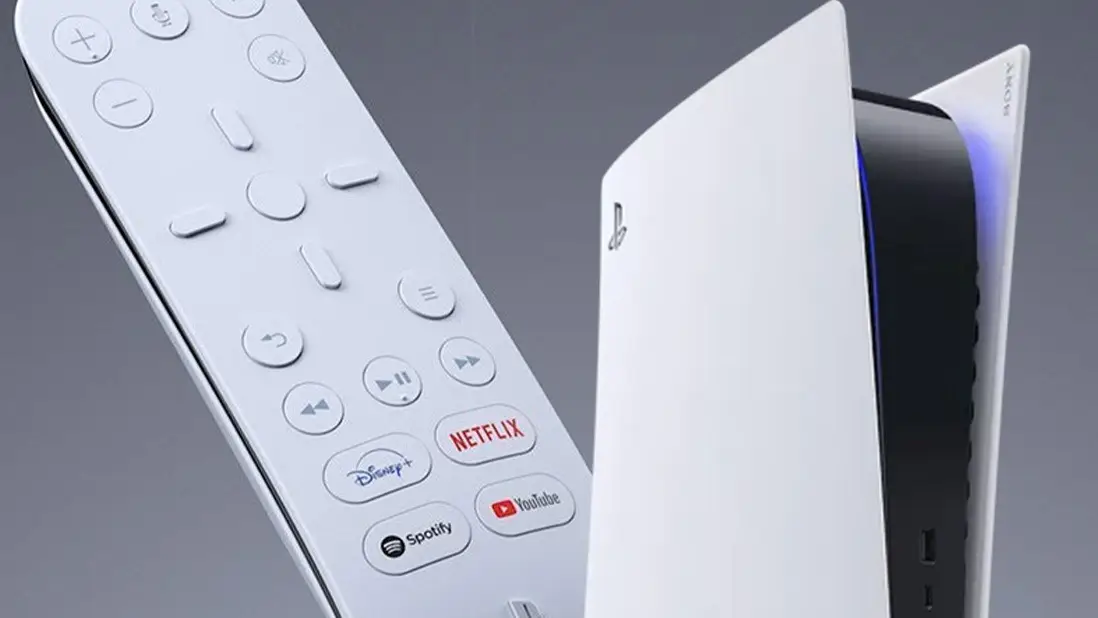
PS5 Media Remote Bypass, Link Up TV Remote With Console


Topics: PlayStation 5, Tech
Topics: PlayStation 5, Tech
I’m always using my PlayStation 5 Media Remote, but it’s only right now that I’ve discovered that you don’t actually need one if you don’t fancy using a DualSense.
Many of us use our consoles to access streaming services, all of which you can do with the regular DualSense controller. It is, however, much easier to navigate those apps using the PS5 Media Remote, which is pretty cheap.
It has standard play, pause, and fast forward buttons, as well as volume controls and shortcuts to your favourite apps like Netflix or Disney Plus.
You can even use the power button to turn off your TV like you would a normal TV remote. It turns out though, that you can actually do a lot of this with your standard TV remote, if you configure your settings in the right way.
Advert
Maybe I’m just a silly little guy, but it’s most definitely something I wasn’t aware of.
This tip comes from Reddit user mr-interested who provided in-depth instructions on how to set this connection up, completely ridding of the need for the PS5 Media Remote.
You’ll want to begin by turning on and enabling HDMI Device Link in your PlayStation 5’s settings.
From here, you’ll then reportedly want to navigate to your TV settings to turn on HDMI-CEC.
This will be named differently depending on what brand of TV you’re using.
On a Sony TV, it’s called Bravia Link whilst on a LG TV, it’s called SimpLink. A quick online search of your brand and the phrase HDMI-CEC should clarify what it is you’re looking for.
From here, you’re pretty much good to go.
There is one small caveat that not all TVs support HDMI-CEC in which case, you won’t be able to make use of your TV remote but the vast majority of contemporary HD TVs should.
The Reddit user also points out that not all of your TV remote’s buttons will accurately match up with inputs on your PlayStation 5.
Play and pause and so on should be pretty like for like, but things may be a tad more complicated beyond that which is worth bearing in mind.
As I said, I find the PS5 Media Remote very helpful and it’s pretty inexpensive, often going on sale for close to £15 or £20, or around $25.
Personally, if you’re not very technically minded or don’t boast the best TV, you’re probably better picking it up or sticking to using your DualSense.
If you want to attempt to give the TV remote hack a go though, the option is there.