Stardew Valley Free Add-On Makes It Much Easier To Track Your To-Do List


Stardew Valley players can now download a free add-on which makes it a lot easier to track what you’re doing, and what you need to do each day.
For over ten years, Stardew Valley has been a consistent source of video game busywork, with players having spent a decade building, maintaining, and refining their in-game farms.
The thing about the game is that there’s so much to do in it, that it can often be a little overwhelming when it comes to plotting out how to go about each day.
Luckily, there exists a mod which can help to keep you organised as you go about your day in Pelican Town, thanks to the new Quest Journal mod released onto Nexus Mods.
Advert
Now, I know Stardew Valley already has a journal feature which is where quests are already tracked. However, let’s face it, it could do with an expansion.
Quest Journal is created with StardewUI to help “track ongoing quests by pinning them, adds cheat controls that lets you complete the quest, lets you warp to NPCs related to the quest and shows you which mod a quest comes from.”
In essence, it’s a much-needed overhaul for Stardew Valley which many players are certain to be thankful for, putting it among some of the best Stardew Valley mods you can get.
Quest Journal creator RafiaBee themselves put it best: “The vanilla quest log is one plain scroll: a title, one line of objective, a reward, and that's it. No way to see the steps of a longer quest, no button to finish or drop a quest, no label saying which mod a quest came from, and nothing on your screen reminding you what you're working on.
“Quest Journal replaces that log with a proper journal. A quest list down the left, all the details in the middle, and buttons on the right.”
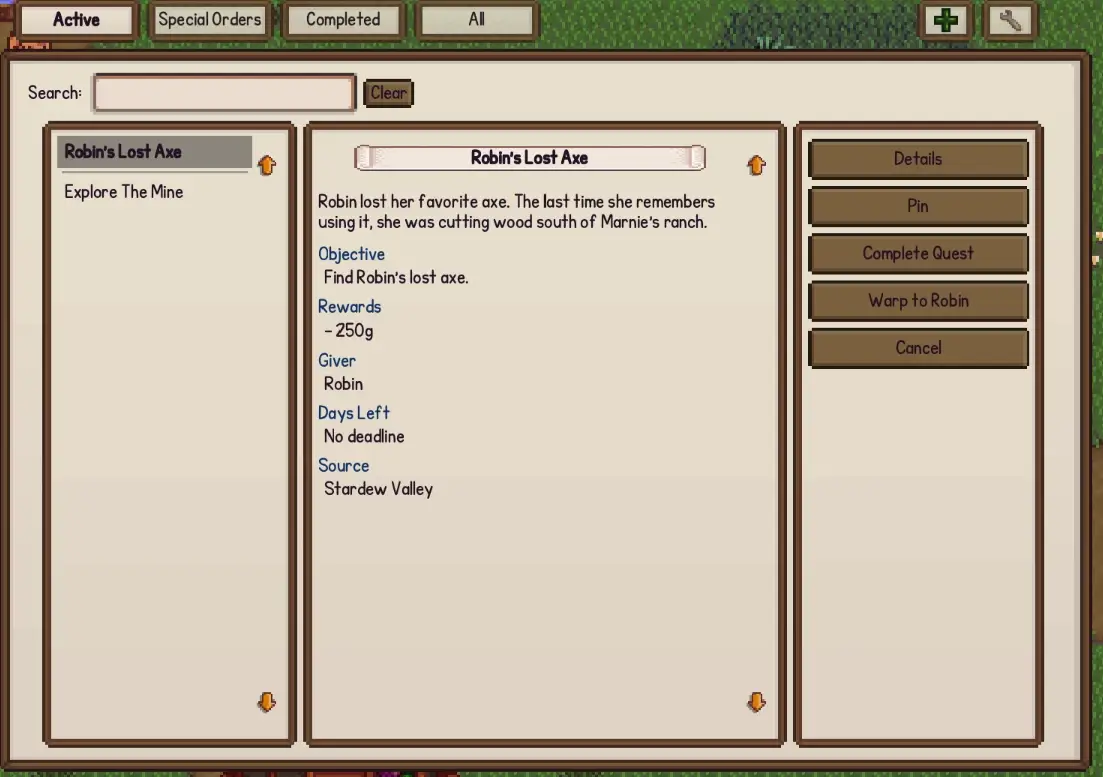
Quest Journal For Stardew Valley Is An Effective Way To Track And Control The Game's Quests
The mod works well enough with quests from the base game version of Stardew Valley, but also adds in extra features when additional mods like More Quests Framework are installed.
Delving deeper into the new features added with the mod, this includes a full details panel such as a title, description, current objective, and rewards.
It also has new actions where you can drop a quest you don’t want, or push a quest’s deadline back a bit so it doesn’t expire before you can get to it.
Meanwhile, board quests get their own tab with their rewards listed out, and you can also pin any quest to the screen where its current goal appears in the top-right corner as you play.
This functionality also includes a search bar, where you can use a keyword or two to find a specific quest, as well as some ‘cheat’ options which will help you to skip certain quests by automatically completing them for you.
This extends to the warp helper, which immediately teleports you to a quest NPC or objective, as well as an item helper which hands you an item which is needed to complete the quest.
If you’d like to check out the Quest Journal mod for Stardew Valley, you can download it now from Nexus Mods.
Read Next: Stardew Valley Mod Introduces A Challenging New Game Mode
Topics: Stardew Valley, Mods, Indie Games, PC